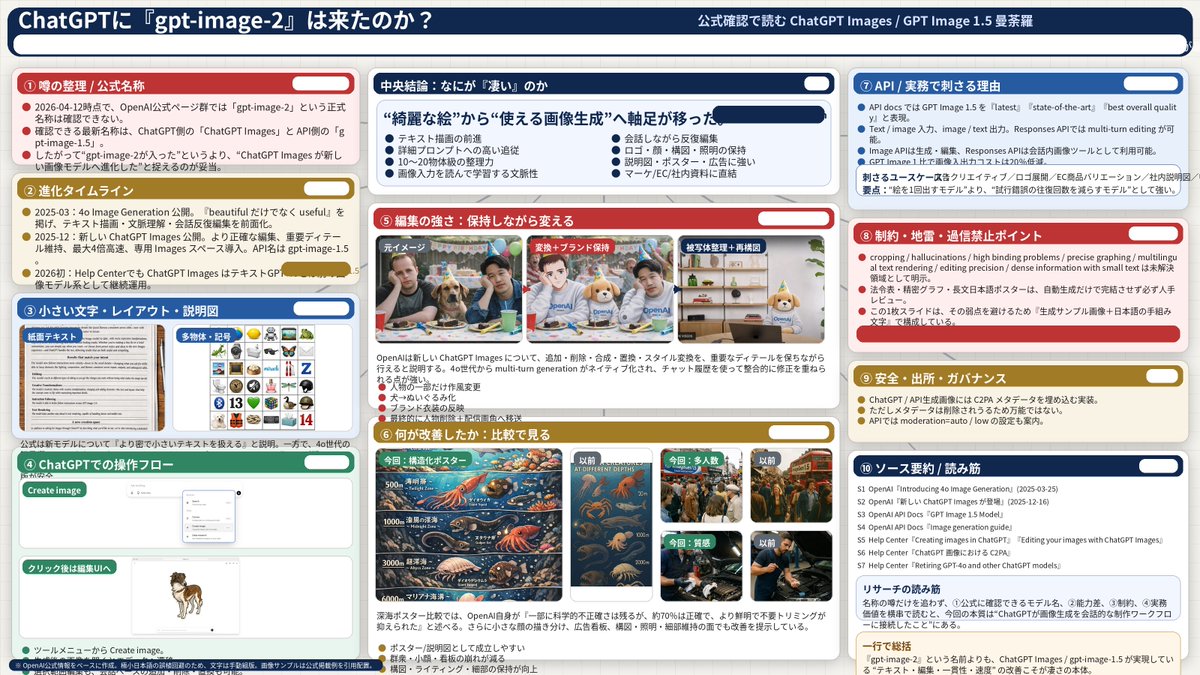
GPT Image 2 AI image example generated with this reusable CDance AI prompt: Generates a highly detailed, 3-column presentation slide analyzing AI model features with 10 distinct sections and embedded comparison images.
Complex AI Model Analysis Infographic
Generates a highly detailed, 3-column presentation slide analyzing AI model features with 10 distinct sections and embedded comparison images.
Prompt
{
  "type": "infographic dashboard",
  "style": "corporate presentation slide, dense information layout, flat design",
  "header": {
    "left_title": "{argument name=\"main title\" default=\"ChatGPTに『gpt-image-2』は来たのか?\"}",
    "right_subtitle": "{argument name=\"subtitle\" default=\"公式確認で読む ChatGPT Images / GPT Image 2 曼荼羅\"}",
    "background_color": "{argument name=\"theme color 1\" default=\"dark blue\"}"
  },
  "layout": {
    "columns": 3,
    "sections": [
      {
        "id": 1,
        "title": "① 噂の整理 / 公式名称",
        "color": "{argument name=\"theme color 2\" default=\"red\"}",
        "content_type": "3 bullet points"
      },
      {
        "id": 2,
        "title": "② 進化タイムライン",
        "color": "gold",
        "content_type": "3 timeline bullet points"
      },
      {
        "id": 3,
        "title": "③ 小さい文字・レイアウト・説明図",
        "color": "blue",
        "content_type": "2 embedded images showing text document and icon grid"
      },
      {
        "id": 4,
        "title": "④ ChatGPTでの操作フロー",
        "color": "green",
        "content_type": "UI mockups showing chat interface and dog image"
      },
      {
        "id": "central",
        "title": "中央結論:なにが『凄い』のか",
        "color": "dark blue",
        "subtitle": "{argument name=\"central conclusion\" default=\"“綺麗な絵”から“使える画像生成”へ軸足が移った\"}",
        "content_type": "2 columns of 4 bullet points each"
      },
      {
        "id": 5,
        "title": "⑤ 編集の強さ:保持しながら変える",
        "color": "red",
        "content_type": "3 sequential images showing photo editing progression"
      },
      {
        "id": 6,
        "title": "⑥ 何が改善したか:比較で見る",
        "color": "gold",
        "content_type": "6 comparison images (This time vs Before) for posters, crowds, textures"
      },
      {
        "id": 7,
        "title": "⑦ API / 実務で刺さる理由",
        "color": "blue",
        "content_type": "3 bullet points"
      },
      {
        "id": 8,
        "title": "⑧ 制約・地雷・過信禁止ポイント",
        "color": "red",
        "content_type": "3 bullet points"
      },
      {
        "id": 9,
        "title": "⑨ 安全・出所・ガバナンス",
        "color": "gold",
        "content_type": "3 bullet points"
      },
      {
        "id": 10,
        "title": "⑩ ソース要約 / 読み筋",
        "color": "dark blue",
        "content_type": "list of 7 sources and a summary box"
      }
    ]
  }
}
Related GPT Image 2 Prompts
VR Headset Exploded View Poster
Generates a high-tech exploded view diagram of a VR headset with detailed component callouts and promotional text.
Illustrated City Food Map
Generates a hand-drawn, watercolor-style tourist map featuring numbered local food specialties, landmarks, and a legend.
Momotaro Explainer Slide in Hybrid Style
A prompt that combines the simple, warm aesthetic of Irasutoya illustrations with the high-information density characteristic of Japanese government slides.
E-commerce Live Stream UI Mockup
Generates a realistic social media live stream interface overlaying a portrait, featuring customizable chat messages, gift popups, and a product purchase card.
Anime Martial Arts Battle Illustration
Generates a dynamic, high-impact anime illustration of two female characters fighting in a traditional dojo with elemental energy effects.
3D Stone Staircase Evolution Infographic
Transforms a flat evolutionary timeline into a realistic 3D stone staircase infographic with detailed organism renders and structured side panels.